MERTANDHOUSE Validated Designs
The first step to purchasing IPaaS is to determine if you want your included IP routed, or delivered on-link. You will need to select this option when you purchase the service, and will not be able to change the option after service is started. If you purchase with the wrong service selected, please enter a support ticket to have your service reprovisioned. This is the only information we need from you, how you design your network is completely up to you, these designs are simply starting points that are known-working.
All designes below are tested on Cisco IOS-XE, but are reproducable on most enterprise routing software, such as PFSense. These are high-level design overviews, more specific configurations for different platforms can be found in our knowledgebase.
Routed Designs
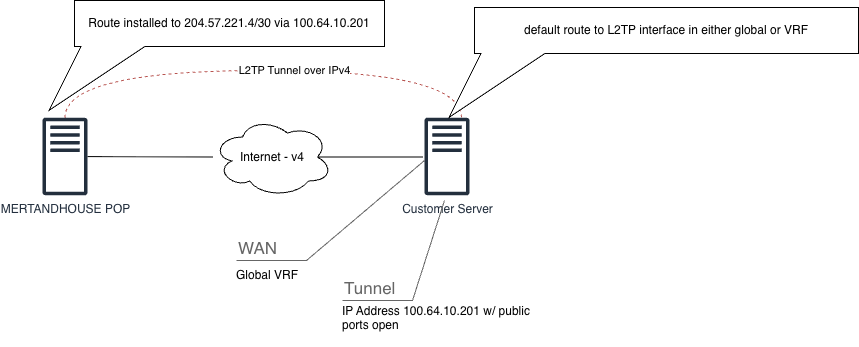
Routed desings are the most common design option for using our IPaaS offering. In this design, your tunnel interface on your CPE device is assigned a CGNAT IP via icip on its tunnel interface. All public IP subscriptions, including the included /32, are routed at this CGNAT tunnel IP. You can then use NAT or PAT to map the IP to whatever internal host is desired. If you are choosing a routed design, and purchase a /30, you may also assign both usable addresses from the /30 directly. 1 address on your CPE, one address on the server you wish to have a public IP.
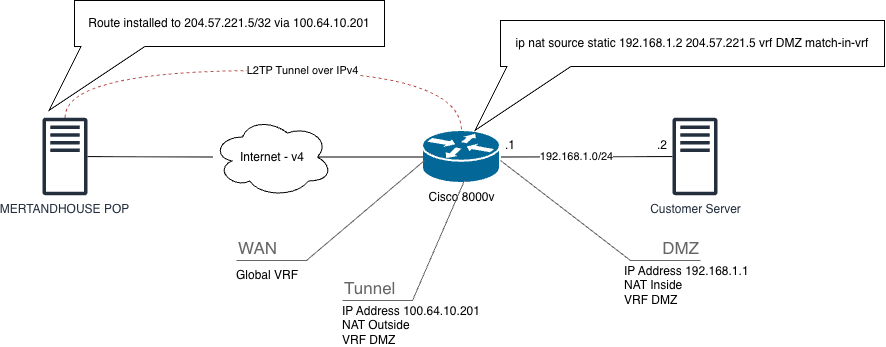
Routed Designs - NAT
This design routes all purchased address space to a CGNAT tunnel IP, allow the customer to statically or dynamically NAT their internal server IP to their purchased public IP(s). View the full configurations here.
Routed Designs - Physical DMZ
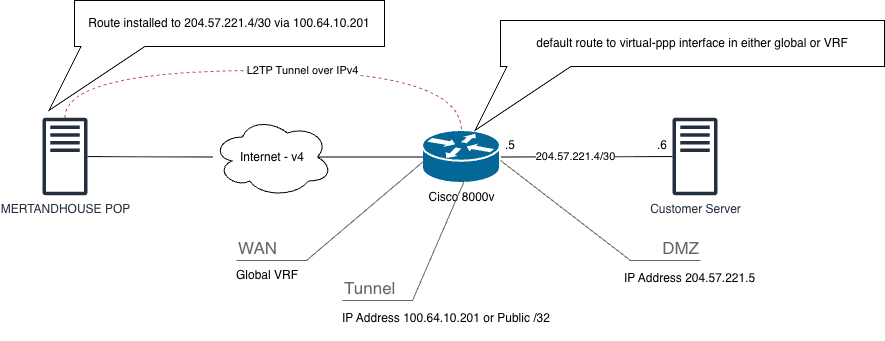
This design routes all purchased address space to a CGNAT tunnel IP, allowing the customer to assign their IPs directly their internal servers. This option requires at least a /30, because you will need 1 IP for your CPE and one for your server. View the full configurations here.
On-Link Designs
On-Link designs deliver your included /32 directly onto your tunnel interface via icip. When you bring your tunnel interface online, you will see a publicly routable IP address on your tunnel interface. This IP can then be translated, or used directly as-is on the tunnel interface. Please note that any additional address blocks will be routed to this /32. We cannot deliver multiple IP addresses on-link, as most CPEs will not accept an entire prefix assigned to their tunnel interface.
On-Link Designs - NAT to Interface
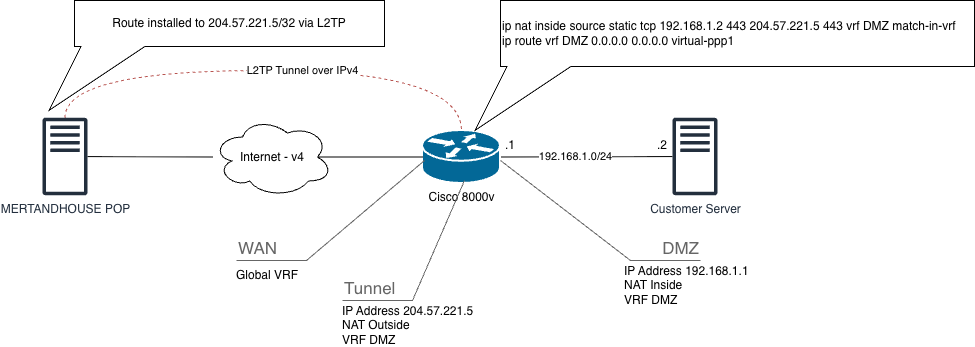
This design delivers your included /32 via icip directly onto your tunnel interface on your CPE. Allowing you to NAT or PAT that address and its ports to internal servers within your network.
On-Link Designs - All in One CPE
This design is useful when the customer is terminating the tunnel directly on the server that is desired to be exposed to the internet. Using a Linux PPP client, you are able to expose ports directly to the allocated address.